Canvas绘图示例
什么是 HTML Canvas
HTML <canvas> 元素是 HTML5 新增的一个绘图标签,它提供了一个可以通过 JavaScript 绘制图形的区域。Canvas 本质上是一个位图画布,允许开发者通过脚本(通常是 JavaScript)动态渲染图形、图表、动画等内容。
基本语法
1<canvas id="myCanvas" width="200" height="100"></canvas>
Canvas 的主要特性
- 动态绘图能力:可以在网页上实时绘制各种图形
- 像素级操作:可以对画布上的每个像素进行精确控制
- 无插件:不需要任何额外插件,原生支持在现代浏览器中
- 丰富的 API:提供了丰富的绘图方法和属性
基本使用步骤
-
获取 Canvas 元素:
1const canvas = document.getElementById('myCanvas'); -
获取绘图上下文:
1const ctx = canvas.getContext('2d'); -
开始绘图:
1ctx.fillStyle = 'red';
2ctx.fillRect(10, 10, 150, 80);
常用绘图方法
绘制矩形
fillRect(x, y, width, height)- 绘制填充矩形strokeRect(x, y, width, height)- 绘制矩形边框clearRect(x, y, width, height)- 清除指定矩形区域
绘制路径
beginPath()- 开始新路径moveTo(x, y)- 移动画笔到指定位置lineTo(x, y)- 绘制直线到指定位置arc(x, y, radius, startAngle, endAngle, anticlockwise)- 绘制圆弧closePath()- 闭合路径fill()- 填充路径stroke()- 描边路径
文本绘制
fillText(text, x, y)- 绘制填充文本strokeText(text, x, y)- 绘制文本轮廓
样式控制
-
颜色:
1ctx.fillStyle = 'blue'; // 设置填充颜色 2ctx.strokeStyle = '#FF0000'; // 设置描边颜色 -
线条样式:
1ctx.lineWidth = 5; // 设置线条宽度
2ctx.lineCap = 'round'; // 设置线条末端样式
3ctx.lineJoin = 'bevel'; // 设置线条连接处样式
应用场景
- 数据可视化:绘制各种图表(柱状图、折线图、饼图等)
- 游戏开发:开发2D网页游戏
- 图像处理:实现滤镜、裁剪等图像处理功能
- 动画效果:创建各种动态效果
- 交互式绘图:实现画板、签名板等功能
性能优化建议
- 尽量减少不必要的画布重绘
- 对于复杂的静态图形,可以考虑先绘制到离屏canvas
- 合理使用
requestAnimationFrame进行动画绘制 - 对于大量相似图形,考虑使用路径批量绘制而非单独绘制
浏览器兼容性
现代浏览器(Chrome、Firefox、Safari、Edge等)都良好支持Canvas。对于IE9以下版本,可以使用兼容库如excanvas.js。
示例:画一个哆啦A梦
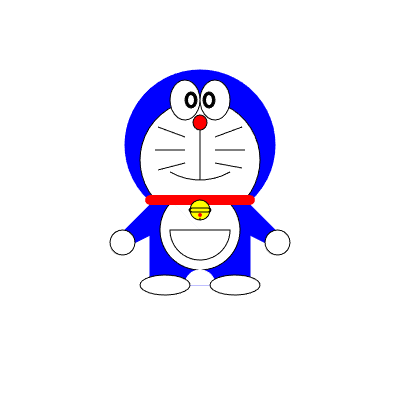
1<!DOCTYPE html>
2<html lang="zh">
3<head>
4    <meta charset="UTF-8">
5    <meta name="viewport" content="width=device-width, initial-scale=1.0">
6    <title>Canvas 哆啦A梦</title>
7    <style>
8        body {
9            background: #f0f0f0;
10            display: flex;
11            justify-content: center;
12            align-items: center;
13            min-height: 100vh;
14            margin: 0;
15        }
16        canvas {
17            display: block;
18            border: 1px solid #ccc;
19            background: white;
20            box-shadow: 0 5px 15px rgba(0,0,0,0.2);
21        }
22    </style>
23</head>
24<body>
25    <canvas id="doraemonCanvas" width="400" height="400"></canvas>
26    <script>
27        (function() {
28            const canvas = document.getElementById('doraemonCanvas');
29            const ctx = canvas.getContext('2d');
30
31            // 辅助函数:将 tkinter 的 create_oval(矩形坐标) 转换为 canvas 椭圆
32            function drawOvalFromRect(x1, y1, x2, y2, fill, outline = 'black', lineWidth = 1) {
33                const cx = (x1 + x2) / 2;
34                const cy = (y1 + y2) / 2;
35                const rx = (x2 - x1) / 2;
36                const ry = (y2 - y1) / 2;
37                ctx.beginPath();
38                ctx.ellipse(cx, cy, rx, ry, 0, 0, Math.PI * 2);
39                ctx.fillStyle = fill;
40                ctx.fill();
41                if (outline) {
42                    ctx.strokeStyle = outline;
43                    ctx.lineWidth = lineWidth;
44                    ctx.stroke();
45                }
46            }
47
48            // 辅助函数:绘制 tkinter 的 chord 弧(填充扇形)
49            function drawChordFromRect(x1, y1, x2, y2, startAngleDeg, extentDeg, fill, outline = 'black') {
50                const cx = (x1 + x2) / 2;
51                const cy = (y1 + y2) / 2;
52                const rx = (x2 - x1) / 2;
53                const ry = (y2 - y1) / 2;
54                const startRad = startAngleDeg * Math.PI / 180;
55                const endRad = (startAngleDeg + extentDeg) * Math.PI / 180;
56
57                ctx.beginPath();
58                ctx.moveTo(cx, cy);
59                // 计算弧起点 (相对于椭圆)
60                const startX = cx + rx * Math.cos(startRad);
61                const startY = cy + ry * Math.sin(startRad);
62                ctx.lineTo(startX, startY);
63                // 绘制椭圆弧 (使用 ellipse 的一段)
64                // 由于 canvas 没有直接绘制椭圆弧的简单方法,这里用缩放变换模拟
65                // 更简单的做法:保存上下文,缩放,画圆,再恢复
66                ctx.save();
67                ctx.translate(cx, cy);
68                ctx.scale(1, ry / rx);  // 将椭圆变为圆 (rx 方向不变,y 方向缩放)
69                ctx.beginPath();
70                ctx.moveTo(0, 0);
71                ctx.lineTo(Math.cos(startRad) * rx, Math.sin(startRad) * rx * (rx / ry)); // 需要调整
72                // 这种方法太复杂,改用参数方程直接画线
73                ctx.restore();
74
75                // 改用更直接的方法:用很多小线段逼近椭圆弧
76                ctx.beginPath();
77                ctx.moveTo(cx, cy);
78                const steps = 50;
79                for (let i = 0; i <= steps; i++) {
80                    const t = i / steps;
81                    const angle = startRad + t * (endRad - startRad);
82                    const x = cx + rx * Math.cos(angle);
83                    const y = cy + ry * Math.sin(angle);
84                    if (i === 0) {
85                        ctx.lineTo(x, y);
86                    } else {
87                        ctx.lineTo(x, y);
88                    }
89                }
90                ctx.closePath();
91                ctx.fillStyle = fill;
92                ctx.fill();
93                if (outline) {
94                    ctx.strokeStyle = outline;
95                    ctx.lineWidth = 1;
96                    ctx.stroke();
97                }
98            }
99
100            // 清除画布
101            ctx.clearRect(0, 0, 400, 400);
102
103            // 大蓝脸 (圆脸)
104            drawOvalFromRect(125, 70, 275, 220, 'blue', 'blue', 1);
105
106            // 白色脸
107            drawOvalFromRect(140, 100, 260, 220, 'white', 'black', 1);
108
109            // 眼睛白色部分 (左眼和右眼)
110            drawOvalFromRect(200, 80, 230, 120, 'white', 'black', 1);   // 右眼 (从角色视角)
111            drawOvalFromRect(170, 80, 200, 120, 'white', 'black', 1);   // 左眼
112
113            // 黑色眼珠
114            drawOvalFromRect(203, 92, 215, 108, 'black', 'black', 1);   // 右眼珠
115            drawOvalFromRect(185, 92, 197, 108, 'black', 'black', 1);   // 左眼珠
116
117            // 眼睛高光
118            drawOvalFromRect(206, 95, 212, 105, 'white', null);          // 右高光 (无边框)
119            drawOvalFromRect(188, 95, 194, 105, 'white', null);          // 左高光
120
121            // 红色鼻子
122            drawOvalFromRect(193, 115, 207, 130, 'red', 'black', 1);
123
124            // 嘴巴弧线 (arc)
125            ctx.beginPath();
126            ctx.arc(200, 120, 60, 60 * Math.PI / 180, 120 * Math.PI / 180);
127            ctx.strokeStyle = 'black';
128            ctx.lineWidth = 1;
129            ctx.stroke();
130
131            // 鼻子下的竖线
132            ctx.beginPath();
133            ctx.moveTo(200, 130);
134            ctx.lineTo(200, 180);
135            ctx.strokeStyle = 'black';
136            ctx.stroke();
137
138            // 胡须
139            ctx.beginPath();
140            // 上横须
141            ctx.moveTo(215, 150); ctx.lineTo(245, 150);
142            ctx.moveTo(155, 150); ctx.lineTo(185, 150);
143            // 斜须
144            ctx.moveTo(158, 127); ctx.lineTo(185, 137);
145            ctx.moveTo(215, 137); ctx.lineTo(242, 127);
146            ctx.moveTo(158, 170); ctx.lineTo(185, 163);
147            ctx.moveTo(215, 163); ctx.lineTo(242, 168);
148            ctx.strokeStyle = 'black';
149            ctx.stroke();
150
151            // 身体矩形 (蓝色)
152            ctx.fillStyle = 'blue';
153            ctx.strokeStyle = 'blue';
154            ctx.lineWidth = 1;
155            ctx.fillRect(150, 200, 100, 85);   // 150->250, 200->285
156            ctx.strokeRect(150, 200, 100, 85);
157
158            // 白色肚皮 (chord 弧)  (160,190,240,270) start=135 extent=270
159            // 使用自定义函数绘制扇形填充
160            // 为了简化,我们使用路径手动绘制扇形
161            const cx1 = (160 + 240) / 2; // 200
162            const cy1 = (190 + 270) / 2; // 230
163            const rx1 = (240 - 160) / 2; // 40
164            const ry1 = (270 - 190) / 2; // 40
165            const start1 = -45 * Math.PI / 180;
166            const end1 = (-45 + 270) * Math.PI / 180; // 405° 相当于 45°
167            ctx.beginPath();
168            ctx.moveTo(cx1, cy1);
169            const steps = 50;
170            for (let i = 0; i <= steps; i++) {
171                const t = i / steps;
172                const angle = start1 + t * (end1 - start1);
173                const x = cx1 + rx1 * Math.cos(angle);
174                const y = cy1 + ry1 * Math.sin(angle);
175                ctx.lineTo(x, y);
176            }
177            ctx.closePath();
178            ctx.fillStyle = 'white';
179            ctx.fill();
180            ctx.strokeStyle = 'black';
181            ctx.stroke();
182
183            // 计算弧的起点 (start1 = -45° 对应 315°) 和终点 (end1 = 225°)
184            const startX = cx1 + rx1 * Math.cos(start1);
185            const startY = cy1 + ry1 * Math.sin(start1);
186            const endX = cx1 + rx1 * Math.cos(end1);
187            const endY = cy1 + ry1 * Math.sin(end1);
188
189            // 计算椭圆上顶点 (角度 90°)
190            const topX = cx1;  // 90° 的余弦为0,所以 x = cx1
191            const topY = cy1;  // 90° 的正弦为1,所以 y = cy1 + ry1
192
193            // 绘制填充三角形
194            ctx.beginPath();
195            ctx.moveTo(startX, startY);
196            ctx.lineTo(endX, endY);
197            ctx.lineTo(topX, topY);
198            ctx.closePath();
199            ctx.fillStyle = 'white';   // 与扇形颜色一致
200            ctx.fill();
201            ctx.strokeStyle = 'white'; // 可选:添加黑色边框以保持风格
202            ctx.stroke();
203
204            // 白色小弧线 (185,270,215,300) start=0 extent=180
205            const cx2 = (185 + 215) / 2; // 200
206            const cy2 = (270 + 300) / 2; // 285
207            const rx2 = (215 - 185) / 2; // 15
208            const ry2 = (300 - 270) / 2; // 15
209            const start2 = 180 * Math.PI / 180;
210            const end2 = 360 * Math.PI / 180;
211            ctx.beginPath();
212            ctx.moveTo(cx2, cy2);
213            for (let i = 0; i <= steps; i++) {
214                const t = i / steps;
215                const angle = start2 + t * (end2 - start2);
216                const x = cx2 + rx2 * Math.cos(angle);
217                const y = cy2 + ry2 * Math.sin(angle);
218                ctx.lineTo(x, y);
219            }
220            ctx.closePath();
221            ctx.fillStyle = 'white';
222            ctx.fill();
223            ctx.strokeStyle = 'white';
224            ctx.stroke();
225
226
227            // 两只脚 (白色椭圆)
228            drawOvalFromRect(140, 275, 190, 295, 'white', 'black', 1);
229            drawOvalFromRect(210, 275, 260, 295, 'white', 'black', 1);
230
231            // 手臂多边形 (左手)
232            ctx.beginPath();
233            ctx.moveTo(150, 205);
234            ctx.lineTo(150, 235);
235            ctx.lineTo(120, 250);
236            ctx.lineTo(120, 235);
237            ctx.closePath();
238            ctx.fillStyle = 'blue';
239            ctx.fill();
240            ctx.strokeStyle = 'blue';
241            ctx.stroke();
242
243            // 右手
244            ctx.beginPath();
245            ctx.moveTo(250, 205);
246            ctx.lineTo(250, 235);
247            ctx.lineTo(280, 250);
248            ctx.lineTo(280, 235);
249            ctx.closePath();
250            ctx.fillStyle = 'blue';
251            ctx.fill();
252            ctx.strokeStyle = 'blue';
253            ctx.stroke();
254
255            // 手掌圆形
256            drawOvalFromRect(110, 230, 135, 255, 'white', 'black', 1);
257            drawOvalFromRect(265, 230, 290, 255, 'white', 'black', 1);
258
259            // 红色项圈 (粗线)
260            ctx.beginPath();
261            ctx.moveTo(150, 200);
262            ctx.lineTo(250, 200);
263            ctx.strokeStyle = 'red';
264            ctx.lineWidth = 10;
265            ctx.lineCap = 'round';
266            ctx.stroke();
267
268            // 铃铛
269            // 黄色主体
270            drawOvalFromRect(190, 200, 210, 220, 'yellow', 'black', 1);
271            // 黑色粗线
272            ctx.beginPath();
273            ctx.moveTo(191, 210);
274            ctx.lineTo(209, 210);
275            ctx.strokeStyle = 'black';
276            ctx.lineWidth = 5;
277            ctx.lineCap = 'round';
278            ctx.stroke();
279            // 黄色细线
280            ctx.beginPath();
281            ctx.moveTo(192, 210);
282            ctx.lineTo(208, 210);
283            ctx.strokeStyle = 'yellow';
284            ctx.lineWidth = 3;
285            ctx.lineCap = 'round';
286            ctx.stroke();
287            // 小红点
288            drawOvalFromRect(198, 213, 202, 217, 'red', null);
289            // 小红点下的竖线
290            ctx.beginPath();
291            ctx.moveTo(200, 218);
292            ctx.lineTo(200, 220);
293            ctx.strokeStyle = 'black';
294            ctx.lineWidth = 1;
295            ctx.stroke();
296
297            // 口袋弧线 (170,200,230,260) start=180 extent=180
298            const cx3 = (170 + 230) / 2; // 200
299            const cy3 = (200 + 260) / 2; // 230
300            const rx3 = (230 - 170) / 2; // 30
301            const ry3 = (260 - 200) / 2; // 30
302            const start3 = 0 * Math.PI / 180;
303            const end3 = 180 * Math.PI / 180; // 180+180=360
304            ctx.beginPath();
305            ctx.moveTo(cx3, cy3);
306            for (let i = 0; i <= steps; i++) {
307                const t = i / steps;
308                const angle = start3 + t * (end3 - start3);
309                const x = cx3 + rx3 * Math.cos(angle);
310                const y = cy3 + ry3 * Math.sin(angle);
311                ctx.lineTo(x, y);
312            }
313            ctx.closePath();
314            ctx.fillStyle = 'white';
315            ctx.fill();
316            ctx.strokeStyle = 'black';
317            ctx.stroke();
318
319            // 恢复线宽为默认,以免影响后续 (虽然没有了)
320            ctx.lineWidth = 1;
321        })();
322    </script>
323</body>
324</html>